SunderSystems

Your AI gets a desktop of its own, sized for your work.

Each client gets its own Linux desktop, in a separate container on hardware we operate, with its own storage and network rules. Your AI works there with our agent harness, and you watch it live.

Sign-up is by invite code for now. Request an invite and we will email you one. Already have a code? Register with your invite code or log in.

Waiting for your answer

Send 3 replies?

Your model, version 3

Trained on
Your approved work
Weights
Open, yours to export
Sheet
1 of 3
Drawn
Your AI desktop
Note
Linux, on our hardware

Illustration, not a screenshot.

Watch it work. Take over. Approve from your phone.

Your AI works on its own desktop, and you watch it live from the browser on your computer or phone. Press Take over to stop it and use the desktop yourself, then hand it back.

Every post and reply waits for your approval unless you say otherwise.

Your work becomes a model of your own.

When you turn training on, the work you approve becomes the examples a compact open-weight model is trained on, so your AI stops depending on a closed model you rent. Training is opt-in and uses your workspace’s data only. When it is delivered, the model is yours to export.

Our first client's own model is in pilot training. It has not been delivered yet.

How you get started, in four steps.

No call and no sales meeting. Your custom model is distilled once there are enough approved examples of your work; until then your workspace runs on an open-weight model.

  1. Request an invite

    Tell us who you are and what you want your AI to do. We email you an invite code when a place opens.

  2. Register

    Register with your code and answer five questions. Your workspace and AI desktop are created.

  3. Practise

    Try it on a practice company with made-up customers. Nothing reaches real people while you learn.

  4. Go live

    Connect your accounts and set your approval rules. By default every draft waits for your yes.

Ask in plain English. Watch it work. Take over when you want.

Your AI works on its own private desktop, and you watch it live from the browser on your computer or phone. Press Take over to stop it and use the desktop yourself: sign in to your social accounts, YouTube or any web app, then hand it back. Every post and reply waits for your approval unless you say otherwise.

Your AI uses the same apps and websites you do, from its own desktop, so many tasks work without paid business integrations. A person on your team works alongside it on research, lead generation and enrichment, approving its work and teaching it new skills, and those approved examples are what your own model is later trained on.

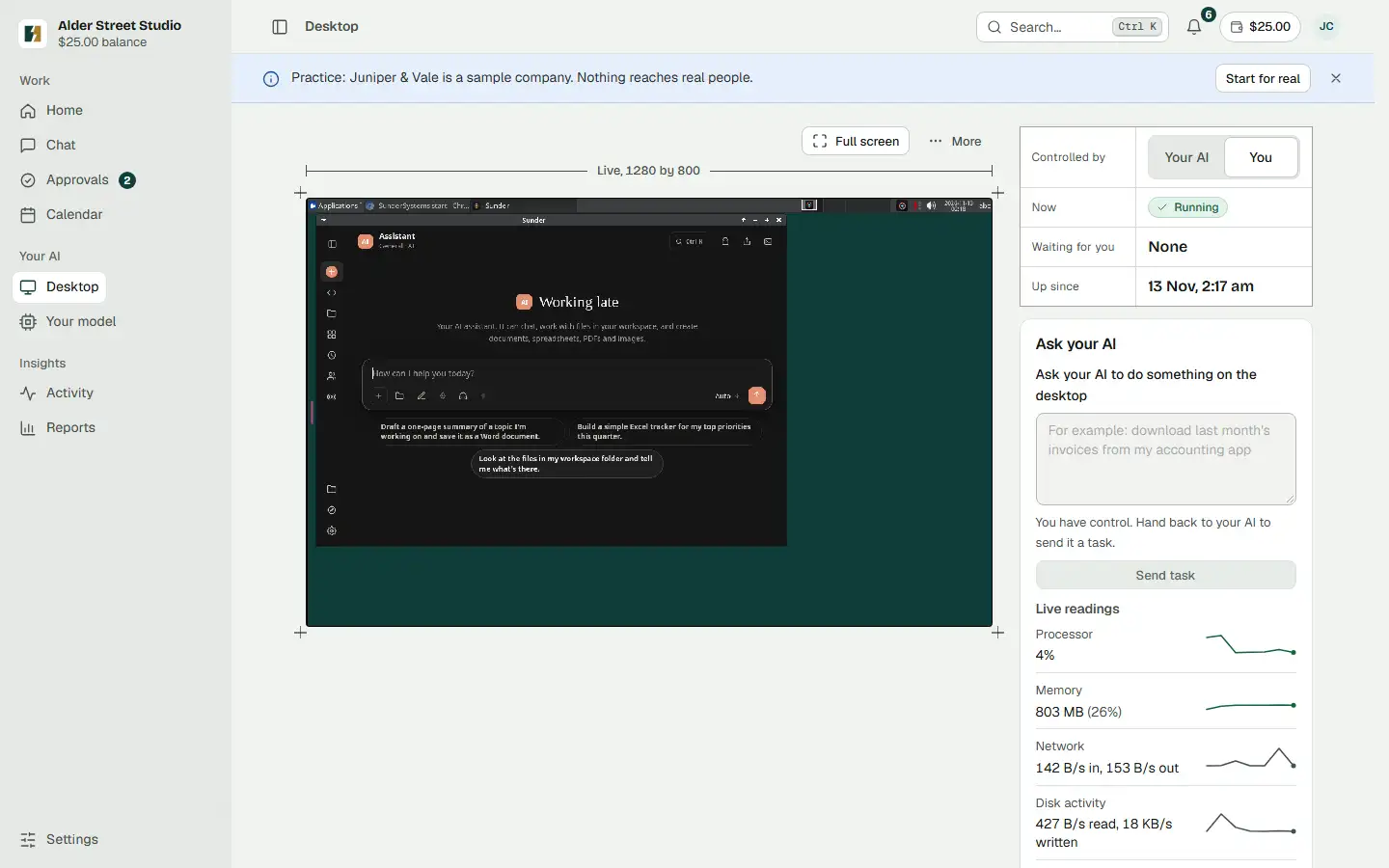
The AI desktop page: a live view of the desktop with the assistant open, a switch to take over or hand back, and live readings of processor and memory.
Its desktop, live. Take over or hand back with one button.
  1. Take over, hand back

    One button stops your AI so you can use the desktop yourself; another gives it back so your AI carries on.

  2. The live desktop

    What your AI sees, as it happens: your own Linux desktop with its own apps and browser.

  3. Ask your AI

    Send a task to the desktop from here. Every post and reply waits for your approval unless you say otherwise.

Open the desktop step in the tour

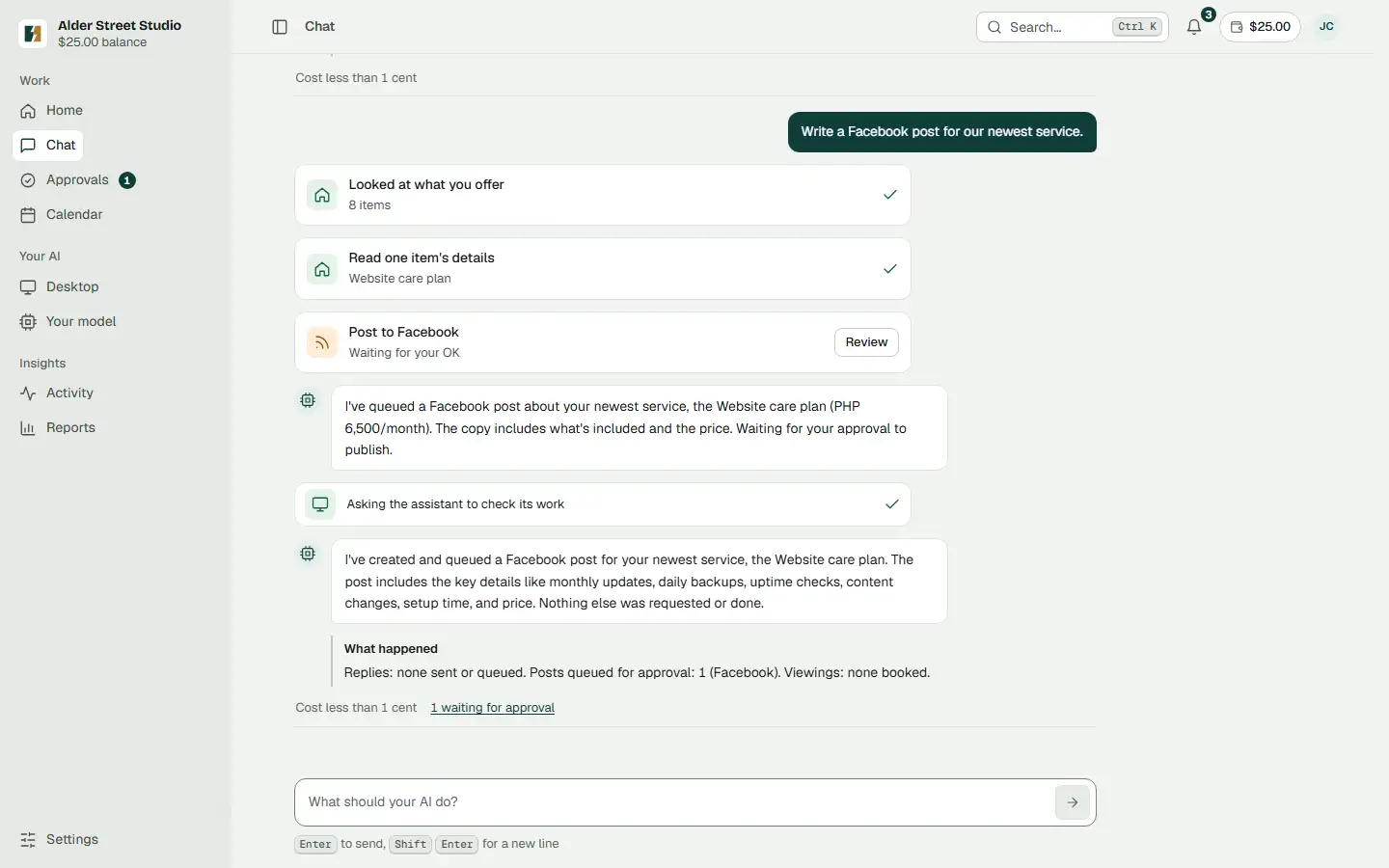
The Chat screen: the request Write a Facebook post for our newest service, then the steps the AI took, each with a tick, the draft waiting for your OK, and the AI's reply.
You ask in chat. It shows each step it takes.
  • Ask in plain EnglishA request in chat, the way you would ask a colleague.
  • Each step, shownThe steps it takes appear as it works, each with a tick.
  • Drafts wait for youPosts and replies go to Approvals unless you say otherwise.

Open the chat step in the tour

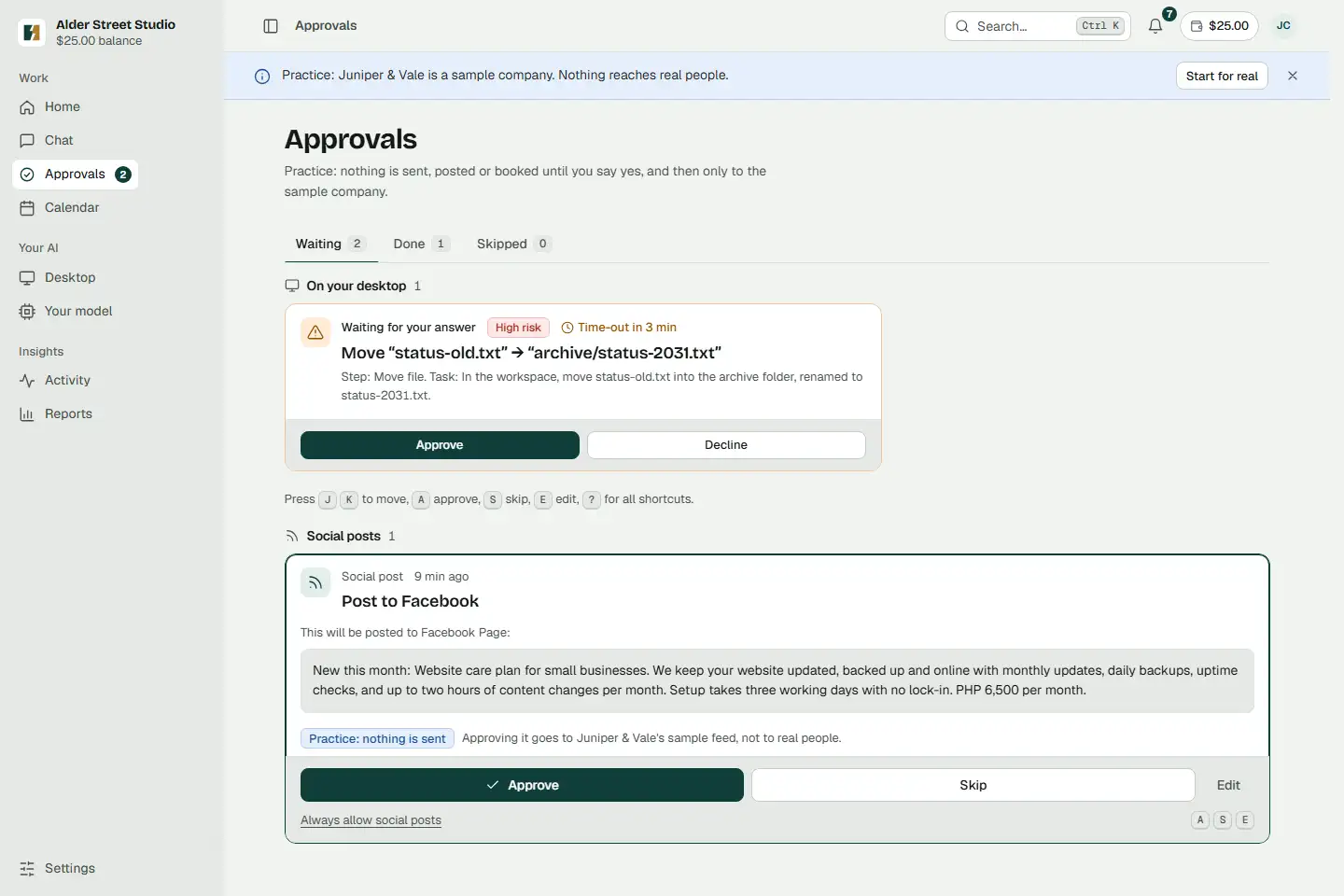
The Approvals screen with two requests waiting: a step on the desktop to move a file, marked high risk with the time left to answer, and a Post to Facebook draft showing the full text, with Approve, Skip and Edit buttons.

Models, tools, machines and usage, in one dashboard.

  • Answer your AI in one listDrafts and desktop steps wait for your yes. Approve, edit or skip, from your phone too.
  • Watch your machine liveTake over and hand back from any browser. A step it stops on shows in the same list.
  • Choose the modelWhich model answers, and whether training is on.
  • Connect your accounts and add toolsAdd tools from the catalogue to your machine.
  • Set rules and see usageChoose what may run on its own. The demo tour shows the wallet, every charge listed, with spending limits and alerts.

Need a new tool, capability or machine? Ask from the same dashboard.

See all capabilities, marked Live, Pilot or Roadmap

The model, the machine and the harness, from one provider.

Available now: a Linux desktop for each client, our agent harness, and the dashboard that runs both. Taking projects now: custom distilled models, with our first client's own model in pilot training. On request: installs on your own servers.

Distillation

Taking projects. We train a compact model to match a larger open-weight model on the tasks you need, using your examples, your requests and your evaluation criteria, and size it for the hardware it will run on, ours or yours.

Training is opt-in, uses only your workspace's data, and when it is delivered the model will be yours to export. Our first client's own model is in pilot training; it has not been delivered yet. More about distillation

Hosting

Available now. Each client gets its own Linux desktop (Ubuntu with Xfce) in a separate container on hardware we operate, with its own storage, disk limit and network rules, and a live view in the dashboard. The containers share one machine; they are not separate virtual machines.

Your model runs there. Until it is trained, AI requests go to an open-weight model: the untuned 4B model on our hardware, or a larger open-weight model through OpenRouter. Requests sent through OpenRouter leave our hardware and go to OpenRouter and the provider it routes to. The AI desktop agent runs on the 4B model on our hardware, or on your own model once one is delivered. Moving the platform to a dedicated server is planned, with no date yet; a separate machine for each client is not offered. More about hosting

Harness and agents

Available now. Our agent harness runs on your machine and does multi-step work: replies and follow-ups, social posts, triage, research, document handling, internal support.

Each agent works with the access you grant. By default anything customer-facing waits for your approval; you choose which tasks may run on their own. More about agents

Dashboard

Available now. One web dashboard for everything: watch your machine live, choose the model, connect your accounts, add tools from the catalogue, set approval rules, and see usage against your wallet.

Requests for new tools, capabilities or resources go through the same dashboard. See all capabilities

Installation

On request. We can scope deployment on your own servers or private cloud, connected to the tools and data you already use.

We have not yet delivered an on-site installation, so the first one would be scoped and tested closely with the client. More about the installation plan

What is true today, and what is planned.

Not a slogan. A plain list of where things stand.

ItemStatus today
Custom modelsFirst one in pilot training

We are taking distillation projects. Our first client's own model is in pilot training; it has not been delivered yet. Training is opt-in, uses your workspace's data only, and when it is delivered the model will be yours to export.

Where requests go todayOpen-weight models

Your workspace runs on our hardware. AI requests go to an open-weight model: the untuned 4B model on our hardware, or a larger open-weight model through OpenRouter. Requests sent through OpenRouter leave our hardware and go to OpenRouter and the provider it routes to. In the web app, chat and tasks in a new workspace start on a larger open-weight model through OpenRouter. They run on the untuned 4B model on our hardware instead when that route is not available, when the wallet holds no real money or when the plan’s monthly model cap is reached. The AI desktop agent runs on the 4B model on our hardware, or on your own model once one is delivered. A workspace that turns training on moves to its own model once it is trained.

MachinesLinux now

Client desktops run Linux today, each in its own container on a shared machine. Windows is not offered yet. On-site installs are scoped on request; we have not delivered one yet.

CostsPlan fee plus usage wallet

You pay a monthly plan fee plus a usage wallet. At 500 messages a month, usage on the 4B model on our hardware is about 20 cents.

A flat monthly fee, then pay only for what the AI uses.

A flat plan fee covers the workspace, the agents and support. A prepaid wallet pays for the AI work, and you see every charge. Prices are in USD and PHP.

Front office

One team that wants replies drafted and meetings proposed.

$99 per month

  • Email replies (pilot)
  • Social inboxes (planned)
  • Scheduling on the workspace calendar
  • Your own Google or Outlook calendar (planned)
  • Social post drafts
  • Approvals from your phone
  • $25 of usage credit added to your wallet each month
  • Open-weight models, on our hardware or through OpenRouter
In pesos₱5,700 per month
PlusUsage wallet

Growth

Teams with more people, accounts and volume.

$349 per month

  • Everything in Front office
  • Voice receptionist (coming soon)
  • More seats and connected accounts (numbers set at sign-up)
  • Your own trained model (in development)
  • Weekly report
In pesos₱20,100 per month
PlusUsage wallet

Private

Teams with strict data rules. We hold no security certifications today, so check your own compliance rules first.

from $1,500 per month

  • Dedicated GPU or on-site SunderSystems box (scoped per client, not yet delivered)
  • SSO (scoped per client, not yet delivered)
  • Data processing addendum (working draft, not yet reviewed by a lawyer)
  • Audit export (coming soon)
  • Priority support
Request an invite

Questions about Private? Email us.

In pesosfrom ₱86,300 per month
PlusUsage wallet

Ten founding places. Your price is locked for 12 months.

Done-for-you setup and a direct line to the founder. We ask for a case study after 60 days. Card payment is not open yet, so we invoice your plan.
See the founding programme

500 messages a month cost $4.00 in model usage on a frontier API and 20 cents on the 4B model on our hardware.

That compares token prices only, using Claude Sonnet 5.5 at the OpenRouter list price as of 11 November 2026. The plan fee is separate. Add your staff hours and see what you get back.

Estimate your savings Compare the plans in full

Request an invite.

Tell us who you are and what you want your AI to do. We email you an invite code when a place opens.

  1. We email you an invite code.
  2. You register and answer five questions.
  3. Your AI desktop is created, with a practice company to try it on.

Already have a code? Register with your invite code or log in.

Questions? Email [email protected], or message us on WhatsApp or Viber.

We use your details only to reply and to send your invite code. See our privacy policy.

Questions about private AI, answered.

What is a sovereign AI model?

A sovereign AI model is one your company owns and runs on infrastructure you control. The weights, the data and the logs stay with you, so no outside provider can change the price, change the model or read your prompts. We do not deliver this yet. Today, in the web app, chat and tasks in a new workspace start on a larger open-weight model through OpenRouter. They run on the untuned 4B model on our hardware instead when that route is not available, when the wallet holds no real money or when the plan’s monthly model cap is reached. The AI desktop agent runs on the 4B model on our hardware, or on your own model once one is delivered. A workspace that turns training on moves to its own model once it is trained. We distill a model trained on your data, run on our hardware; our first client's own model is in pilot training, and none has been delivered yet.

What is AI model distillation?

Distillation trains a small model to copy how a much larger model behaves on a specific job. The result is faster and cheaper to run, and it can sit on a single server instead of a rented cloud API.

Will a smaller model be as good as the big ones?

On a narrow, well-defined task, often yes, but not always. You judge it yourself: first on a practice company, then on your own work, with drafts waiting for your approval until you trust them. When per-client training launches, we plan to test each trained model against a large one on your own examples before it is used.

Can you host it for us, or does it have to run in our building?

Today we host it. Your workspace and its desktop run on hardware we operate. AI requests go to an open-weight model: the untuned 4B model on our hardware, or a larger open-weight model through OpenRouter. Requests sent through OpenRouter leave our hardware and go to OpenRouter and the provider it routes to. We can scope an installation on your own servers, but we have not delivered one yet. Moving the platform to a dedicated server is planned, with no date yet; a separate machine for each client is not offered.

What does it take to get started?

Request an invite on this site. We email you a code, you register, answer five questions and your AI desktop is created. Card payment is not open yet, so we invoice your plan.